Tycoon, but One Dropper Controls: Upgrades and Menus
Learn Tycoon, but one dropper controls for upgrades, codes, gear, and rewards. Navigate factory menus and plan your next purchases with a beginner guide.
Jump to

Tycoon, but one dropper Controls Explained
Your factory earns automatically, but choosing where to spend that cash keeps it growing. Tycoon, but one dropper controls center on purchases, reward menus, and upgrades around your single machine. Learn the Tycoon, but one dropper controls early so you can spend more time improving production and less time hunting for the right panel.
Start by following the tutorial arrow. It guides you through the opening purchases and introduces the factory’s progression loop: earn cash, buy improvements, and use the increased income to afford more expensive upgrades.
The main interactions break down like this:
| Feature | What you do | What it handles |
|---|---|---|
| Tutorial arrow | Follow its direction | Opening progression |
| Factory purchases | Buy available upgrades around your base | Production improvements and construction |
| Codes | Select the button on the right | Opens the code redemption panel |
| Blacksmith | Open its menu | Scrap purchases and equipment |
| My Gear | Open the equipment menu | Your collected gear |
| Auto Upgrade | Purchase the game pass | Automatically buys upgrades |
Cash collection happens automatically. Watch your balance while the factory runs, then return to the purchase you want when you can afford it. You can keep checking menus and available improvements while your money builds.
Keep that automatic collection separate from Auto Upgrade. The factory can collect earnings while you handle purchases yourself; the paid automation feature takes over buying upgrades.
Open Tycoon, but one dropper on Roblox to start your factory. Once the tutorial is underway, use its arrow as your route through the opening setup.
The useful part of learning Tycoon, but one dropper controls is recognizing which interaction you need next: a factory purchase, a reward claim, or an equipment menu. Each serves a different part of your progression.
Buy Income Upgrades Before Expanding Your Spending
Your single dropper anchors the factory, but the surrounding upgrades give you plenty to purchase. Solar panels, electrical improvements, turbines, and a water tower appear during progression, alongside upgrades closer to the central machinery.
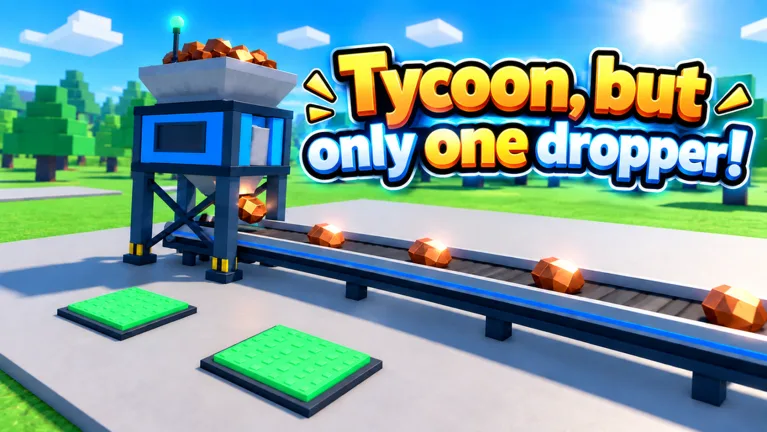 Image: Roblox / •Simple Games
Prioritize purchases that increase income. Check the production upgrades around the middle of your factory before spending your balance on other construction. Keep returning to that area as more purchases become affordable.
Use this sequence when deciding what to do next:
- Follow the tutorial through the opening setup.
- Look for an affordable income upgrade.
- Buy it and check your displayed earnings.
- Inspect the remaining production purchases.
- Let cash accumulate when your next target costs more than your balance.
This keeps your attention on the earning loop. Buying something changes your available cash immediately, while improving production helps fund later purchases.
Watch your cash balance and your income-per-second display separately. Your balance tells you what you can buy now. Your earnings rate tells you how quickly that balance is growing. A large balance can disappear into an expensive upgrade, so check both before choosing another purchase.
| Factory information | What it tells you | What to do with it |
|---|---|---|
| Current cash | Money available to spend | Compare it with the next purchase price |
| Income per second | Your current earning rate | Check it after production upgrades |
| Purchase price | Cash required for that upgrade | Save toward a specific target |
| Remaining factory purchases | Construction still available | Revisit them as your balance increases |
When a purchase remains unaffordable, wait for your automatic income to cover it. Check rewards or equipment during that gap, then return to your target.
Tycoon, but one dropper controls stay straightforward as prices climb. The decisions take more attention: which upgrade increases production, what you can afford, and whether another purchase would use the cash you were saving.
Update 3.1 speeds up early-to-midgame progression. Keep checking the factory after purchases so you can spot the next available improvement instead of assuming your opening setup is finished.
Use Codes, Daily Rewards, and the Spin Wheel
Rewards give you additional resources alongside factory income. Daily rewards, task rewards, group rewards, codes, and the spin wheel all appear in the game’s progression.
Start with the Codes button on the right side of the screen. That is the direct route to the redemption panel.
How to Redeem a Code
- Launch the game and let your base load.
- Select Codes on the right.
- Paste a code into Enter code here.
- Select Redeem.
- Read the result before entering another code.
Copy each code exactly, including capitalization, and remove extra spaces. If an entry fails, check your spelling before trying again. Expired codes and codes already used on your account can also be rejected.
These October 2026 codes provide several different reward types:
| Code | Reward |
|---|---|
Halloween | 25 Candy and 2x Cash for 10 minutes |
Update3 | 2x Cash for 15 minutes |
Gear | 15 Scrap |
The rewards serve different purposes. Cash boosts increase earnings for a limited period, Scrap goes toward Blacksmith purchases, and Candy belongs to the Halloween event.
Redeem a timed cash boost when you are ready to keep playing and make purchases. Use the earning window to work through production upgrades, then keep checking what your increased balance can afford. Plan around the duration shown for the reward.
Claim Rewards Between Purchases
Check your daily rewards and task menu while saving for an upgrade. Claim completed tasks, then review your balance before returning to the factory.
The spin wheel adds another reward opportunity. Its rewards include cash payouts labeled as five minutes or 30 minutes of cash, and the wheel uses a 15-minute wait between spins.
Keep the wheel’s cash rewards separate from a 2x Cash boost. A reward labeled as an amount of cash and a temporary earnings multiplier are different bonuses.
Join the Simple Games group for group rewards, and check the in-game reward interaction afterward. Group rewards are separate from promotional codes, so joining the group does not replace using the Codes panel.
For a quick check between upgrades:
- Claim available daily rewards.
- Collect completed task rewards.
- Check whether another spin is ready.
- Return to the factory and review affordable purchases.
These menus are part of Tycoon, but one dropper controls worth learning early. They give you useful actions to handle during the stretches when automatic income is building toward your next purchase.
Turn Scrap Into Equipment at the Blacksmith
Scrap has its own use at the Blacksmith. Open that menu to access purchases such as the scrap tools box, then check My Gear for the equipment you collect.
The basic sequence is:
- Open the Blacksmith.
- Review the Scrap purchase you want.
- Buy the box when you have enough Scrap.
- Open it.
- Check My Gear for the equipment.
Glasses are one possible equipment result from the scrap tools box. After opening a box, take a moment to inspect your collection and equip the item you want to wear.
The Gear code awards 15 Scrap, making it directly relevant to this menu. Check your Scrap total after redeeming it, then review the Blacksmith’s purchase options.
Keep your currencies straight when switching between factory and equipment menus. Factory upgrades spend cash, while the Blacksmith purchase uses Scrap. Look at the resource required before deciding what to claim or purchase next.
Once you know the Blacksmith and My Gear menus, Tycoon, but one dropper controls become easier to navigate between upgrades. You can check equipment during an income wait, then return to production purchases without losing track of your next goal.
Understand Auto Upgrade, Game Passes, and Expansion
Auto Upgrade is a paid feature that buys upgrades automatically. In Update 3.1, it costs 12 Robux.
That is a separate function from automatic cash collection. With manual purchasing, you choose the upgrades yourself while earnings accumulate. Auto Upgrade handles those purchases for you.
Review the pass description before buying, especially when comparing automation with an earnings bonus. The available passes affect different parts of the factory:
| Game pass | Price | Effect |
|---|---|---|
| Auto Upgrade | 12 Robux | Automatically buys every upgrade |
| 2x Cash | 249 Robux | Doubles all cash permanently |
| Turbo Dropper | 199 Robux | Makes the dropper produce 50% faster |
| VIP | 249 Robux | Adds x1.5 cash, a VIP-only Money Printer upgrade, and a chat tag |
| Lucky Drops | 149 Robux | Enables golden x10 drops from the start |
Keep temporary code rewards and permanent passes separate when reading their descriptions. A code granting 2x Cash for 15 minutes has a timer. The 2x Cash pass provides its multiplier permanently.
Check the exact effect you want before spending Robux. Choose based on the feature described: automatic purchasing, faster drops, a cash multiplier, or access to the VIP benefits.
Keep Rebirth Milestones in View
Factory progression also leads toward rebirths and additional space. The second floor unlocks at rebirth seven, while the Sky Wing unlocks at rebirth eleven. Update 3.1 adds more expansions to the Sky Wing.
Use those milestones as longer-term targets while handling the purchases in front of you. Check what a purchase unlocks, keep improving income, and review your next rebirth goal as the factory develops.
Avoid spending purely because your balance looks large. Compare the next available upgrades and put cash toward the production improvements you want before moving on to other construction.
Mastering Tycoon, but one dropper controls means keeping those short-term actions connected to your next milestone. Collect earnings, make deliberate purchases, claim rewards, and revisit the factory as your options expand.
FAQ
What are the main Tycoon, but one dropper controls?
Follow the tutorial arrow for opening progression, buy upgrades around your factory, and use the on-screen menus for rewards and equipment. The Codes button is on the right. Open the Blacksmith for Scrap purchases and My Gear to manage equipment.
Do I need to collect cash manually?
Cash is collected automatically. Watch your balance and spend it on factory upgrades when you have enough. Auto Upgrade is a separate paid feature that automatically buys upgrades.
Where do I enter codes?
Select Codes on the right side of the screen, paste an entry into Enter code here, and select Redeem. Enter codes exactly as written and remove accidental spaces.
When do the second floor and Sky Wing unlock?
The second floor unlocks at rebirth seven, and the Sky Wing unlocks at rebirth eleven. Update 3.1 includes additional Sky Wing expansions.
Continue with
 Tycoon, but One Dropper Daily Rewards: How to ClaimGet more from Tycoon, but one dropper daily rewards with cash tips, free spin details, group bonuses, and code rewards to help upgrade your factory faster.
More in Guides
See all GuidesPopular pages

Tycoon, but One Dropper Codes: Free Rewards in October
Get Tycoon, but one dropper codes for Candy, Scrap, and 2x Cash boosts. Find current rewards, expired codes, and steps to redeem them in Roblox today.
Tycoon, but One Dropper Leaderboard: Top 100 Rank Guide
Explore the Tycoon, but one dropper leaderboard, Top 100 nametags, cash upgrades, and rebirth milestones. Plan your next factory push with practical tips.
Tycoon, but One Dropper Discord: Community Join Guide
Find the Tycoon, but one dropper discord community, follow update news, check reward codes, and get practical help with upgrades, gear, and factory growth.
Tycoon, but One Dropper Candy: Halloween Event Guide
Tycoon, but one dropper candy comes from Halloween pails and a free code. Learn how to collect it while upgrading your factory during the seasonal event.
Join the community
Official channels for news, updates and player help: