Tycoon, but One Dropper Leaderboard: Top 100 Rank Guide
Explore the Tycoon, but one dropper leaderboard, Top 100 nametags, cash upgrades, and rebirth milestones. Plan your next factory push with practical tips.
Jump to
What Does the Tycoon, but one dropper Leaderboard Include?
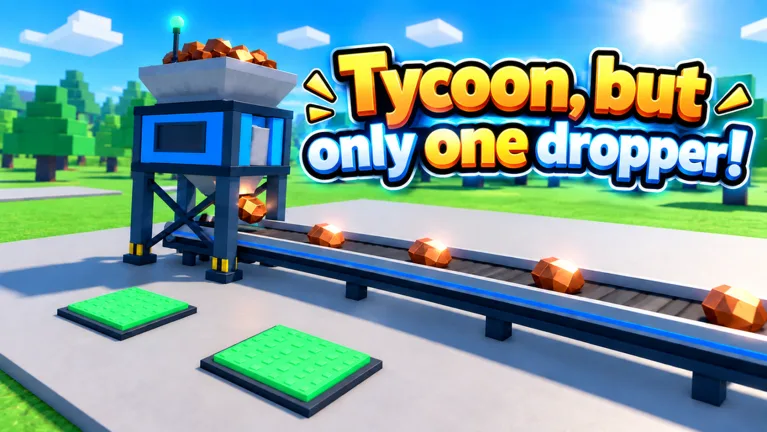
One dropper gives you plenty to compete over: Update 3.1 adds a Top 100 leaderboard with nametags. The Tycoon, but one dropper leaderboard gives your factory-building sessions a competitive target beyond the next purchase. To work toward the Tycoon, but one dropper leaderboard, focus on productive upgrades, use cash rewards deliberately, and keep your rebirth milestones in view.
Your immediate job is still running the factory. Earn cash, improve the setup around your single dropper, and expand as you progress. Turn that familiar loop into a plan by choosing an achievable factory target for each session.
Update 3.1 brings several changes relevant to that climb:
| Update 3.1 feature | What changes for your next session |
|---|---|
| Top 100 leaderboard with nametags | Adds a competitive target with visible recognition |
| Faster early-to-midgame progression | Speeds up that portion of factory development |
| New Sky Wing expansions | Adds more expansion content in the Sky Wing |
| New icons and bug fixes | Updates presentation and addresses game issues |
Start by checking your current factory needs. If an income upgrade is within reach, make that your immediate objective. If you are approaching an expansion milestone, organize your purchases around getting there.
Keep your ambitions manageable. A Top 100 target can motivate a long grind, but “buy the next productive upgrade” gives you something concrete to do right now. Use both kinds of goals without letting the distant one distract you from the next useful purchase.
Build Income Before Chasing More Purchases
The Tycoon, but one dropper leaderboard can pull your attention toward other players, but your next spending decision happens at your own base. Focus on purchases that improve cash generation, then use the increased income to fund more development.
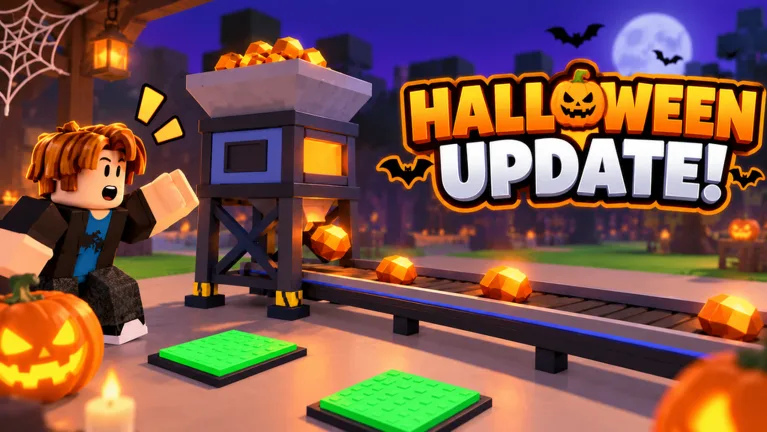 Image: Roblox / •Simple Games
The factory includes more than the dropper itself. Solar panels, electrical upgrades, turbines, motors, and other additions appear during progression. Follow the tutorial arrow when starting out, then pay attention to how each purchase affects your income.
| Factory element | Role during progression | Action to take |
|---|---|---|
| Single dropper | Central money-making machine | Keep its upgrades in your purchase plan |
| Solar panel | An early income-generating addition | Build it as you develop the starting factory |
| Electrical and turbine upgrades | Part of the factory’s upgrade progression | Compare their costs with your next income target |
| Ore upgrades | Change the ore as progression advances, including gold ore | Include them when reviewing available purchases |
| Factory expansion | Gives the setup more room to develop | Check expansion opportunities alongside income upgrades |
Compare the purchase with the wait
Before spending, look at the upgrade price and your current cash per second. Prioritize an income increase when it helps fund the remaining factory purchases.
Avoid buying every affordable addition just because its button is available. Work through the money-making upgrades deliberately, especially when several purchase options compete for the same balance.
Expensive upgrades introduce waiting periods as your cash accumulates. Use those pauses to review unfinished tasks, claim completed rewards, and decide what you will buy next. Return to the purchase with a plan instead of spending the balance on something else along the way.
Use cash per second as a personal progress marker
Cash per second gives you a useful way to track factory development between purchases. Watch how the figure changes after an upgrade, then use it to assess the next stretch of progression.
Keep this separate from your competitive goal: track income to manage the factory, and check the leaderboard to follow the competition. That gives each number a practical purpose.
For your next session:
- Follow the tutorial until the basic factory loop makes sense.
- Review available income upgrades before spending.
- Claim completed daily tasks while waiting for cash.
- Choose the next purchase before your balance reaches its price.
This routine gives every waiting period an endpoint and every purchase a reason.
Plan Around Rebirth and Expansion Milestones
Rebirth progression gives the Tycoon, but one dropper leaderboard grind some useful intermediate goals. Two milestones stand out: the second floor at rebirth seven and the Sky Wing at rebirth eleven.
| Progression milestone | Unlock |
|---|---|
| Rebirth seven | Second floor |
| Rebirth eleven | Sky Wing |
| Update 3.1 Sky Wing content | Additional expansions on the Sky Wing |
Write down your next milestone before starting a longer session. If the second floor is still ahead, use rebirth seven as your larger progression target. Once you move beyond that stage, keep the Sky Wing milestone in view.
Balance that larger objective with your current factory needs. Keep reviewing productive upgrades as you progress rather than treating every purchase as an isolated decision.
Give each session a clear objective
Choose something you can recognize when it happens: purchase an income upgrade, reach a rebirth milestone, or develop an available expansion. Clear objectives make it easier to judge whether your session moved the factory forward.
For longer sessions, combine a factory target with a reward check. Claim completed tasks during cash waits, then return to your planned purchases.
Update 3.1 also speeds up early-to-midgame progression. Revisit the next unlock as you advance, especially when you move into a new part of the factory. Let the available purchases guide your immediate spending while the rebirth milestones provide direction.
Keep your Tycoon, but one dropper leaderboard goal alongside those objectives. Progress through the factory gives you useful accomplishments to pursue throughout the climb.
Use Codes, Daily Rewards, and Scrap Deliberately
Free rewards give you more resources to work with while developing the factory. Cash boosts, Candy, Scrap, daily rewards, and wheel prizes all appear in the game’s reward systems.
For the Tycoon, but one dropper leaderboard, use these rewards to support a planned session. Decide which purchases you want to make, then claim the rewards that help you continue playing toward them.
These codes were listed as active on October 14, 2026:
| Code | Reward |
|---|---|
Halloween | 25 Candy and 2x Cash for 10 minutes |
Update3 | 2x Cash for 15 minutes |
Gear | 15 Scrap |
Redeem codes carefully
The redemption panel is on the right side of the screen:
- Open Tycoon, but one dropper on Roblox.
- Select the Codes button.
- Paste a code into the Enter code here field.
- Select Redeem to claim the reward.
Enter each code exactly as shown and remove accidental spaces. If a code is rejected, check your entry before trying another; codes have limited availability and can already have been redeemed on your account.
Use timed cash boosts during a session when you can keep working through purchases. Identify the upgrades you want beforehand so you can spend more of that session progressing.
Check rewards during cash waits
Daily rewards and completed daily tasks provide claim opportunities alongside factory development. Check them while saving for a purchase, then put your attention back on the upgrade plan.
The reward wheel also offers cash prizes, including rewards labeled as five minutes of cash and thirty minutes of cash. Check the wheel when it becomes available and use the reward toward your next factory objective.
Give Scrap its own job
Scrap belongs in your equipment plan. At the blacksmith, a Scrap Tools Box costs 15 Scrap, matching the amount awarded by Gear.
The box can provide equipment, including glasses, and equipment appears under My Gear. Open the box and inspect what you receive before returning to your factory purchases.
Keep Candy separate in your planning, too. The Halloween reward includes both Candy and a timed cash boost, so check both parts of the reward after redemption.
Compare Optional Passes Before Spending Robux
Paid passes offer cash multipliers, automation, and changes to dropper behavior. Review the specific benefit before deciding whether to spend Robux on your Tycoon, but one dropper leaderboard push.
The following prices and benefits apply to the October 15, 2026 snapshot:
| Game pass | Price | Included benefit |
|---|---|---|
| 2x Cash | 249 Robux | Permanently doubles all cash |
| Auto Upgrade | 12 Robux | Automatically buys every upgrade |
| Turbo Dropper | 199 Robux | Makes the dropper drop 50% faster |
| VIP | 249 Robux | 1.5x cash, a VIP-only Money Printer upgrade, and a [VIP] chat tag |
| Lucky Drops | 149 Robux | Golden x10 drops from the start |
Match the purchase to the feature you want. Choose automation for automatic purchasing, examine cash passes for their stated multipliers, and review Turbo Dropper for its production-speed change.
Keep the VIP chat tag and leaderboard nametags distinct when comparing features. VIP includes a [VIP] chat tag; Update 3.1 introduces nametags alongside the Top 100 leaderboard.
Before buying, review the pass inside the game and set a Robux budget. Make the decision around a specific benefit rather than the pressure of watching someone else progress.
Set up your next leaderboard session
Use a short preparation routine when you return:
- Open the official Tycoon, but one dropper Roblox experience.
- Review your available factory upgrades.
- Pick an immediate purchase target and a larger progression milestone.
- Claim available daily rewards and completed tasks.
- Redeem an unused code when you are ready to use its reward.
- Continue upgrading, checking expansions as they become relevant.
Keep that routine flexible enough for your current stage. Early sessions revolve around getting the factory producing; later objectives include rebirth milestones and expansion work. Return to the leaderboard between those goals to keep the competitive target in view.
FAQ
Does the Tycoon, but one dropper leaderboard have Top 100 nametags?
Yes. Update 3.1 introduces a Top 100 leaderboard with nametags. The update also adds Sky Wing expansions, faster early-to-midgame progression, new icons, and bug fixes.
When do you unlock the second floor and Sky Wing?
The second floor unlocks at rebirth seven, and the Sky Wing unlocks at rebirth eleven. Use those milestones as longer-term objectives while working through your current factory upgrades.
How do you redeem codes in Tycoon, but one dropper?
Select Codes on the right side of the screen, enter a code in the text field, and select Redeem. Copy the spelling and capitalization exactly, and remove extra spaces before submitting.
What does the Gear code give you?
Gear awards 15 Scrap. A Scrap Tools Box at the blacksmith costs 15 Scrap and can provide equipment, including glasses. Check My Gear after opening the box to review your equipment.
Popular pages
Tycoon, but One Dropper Discord: Community Join Guide
Find the Tycoon, but one dropper discord community, follow update news, check reward codes, and get practical help with upgrades, gear, and factory growth.
Tycoon, but One Dropper Candy: Halloween Event Guide
Tycoon, but one dropper candy comes from Halloween pails and a free code. Learn how to collect it while upgrading your factory during the seasonal event.

Tycoon, but One Dropper Controls: Upgrades and Menus
Learn Tycoon, but one dropper controls for upgrades, codes, gear, and rewards. Navigate factory menus and plan your next purchases with a beginner guide.
Tycoon, but One Dropper 2x Cash: Boosts & Pass Guide
Get Tycoon, but one dropper 2x cash with timed codes or the permanent pass. Compare the 249 Robux upgrade, rewards, and tips to grow your factory faster.
Join the community
Official channels for news, updates and player help: