Tycoon, but One Dropper Auto Upgrade: Price & Tips
Tycoon, but one dropper auto upgrade costs 12 Robux. Learn what it does, compare other passes, and plan your cash upgrades for smoother factory progress.
Jump to

What Does Auto Upgrade Do, and How Much Does It Cost?
Tycoon, but one dropper auto upgrade costs 12 Robux and automatically purchases upgrades for you. That saves attention when your factory routine becomes a cycle of earning cash, finding another purchase, and upgrading again. Tycoon, but one dropper auto upgrade handles the buying while your growing income funds the factory.
The appeal is straightforward: this Roblox tycoon revolves around developing a single dropper setup. Your purchases improve that operation and expand your base, so upgrading remains central throughout progression.
Here are the key details for Update 3.1, as of October 15, 2026:
| Detail | Auto Upgrade |
|---|---|
| Price | 12 Robux |
| Purchase type | Game pass |
| Function | Automatically purchases upgrades for you |
| Other paid options | Separate passes offer cash multipliers, faster drops, and additional benefits |
Think of Tycoon, but one dropper auto upgrade as a convenience purchase. Its stated benefit is automatic buying. The separate cash and dropper passes have their own effects, so choose around the part of the game you want to change.
Check the purchase name and Robux price before spending. The factory includes multiple paid options, and Auto Upgrade has a specific role among them.
Cash also collects automatically during regular play. Keep that separate from automatic upgrading: receiving income and spending it on improvements are different parts of the loop. Seeing your balance climb does not mean you already own the upgrade pass.
Start by deciding whether you enjoy choosing each purchase yourself. Manual upgrading gives you direct control over where your cash goes; automatic purchasing reduces the attention that buying requires. Neither decision removes the importance of developing your money-making setup.
You can play Tycoon, but one dropper on Roblox to check the in-game purchase option.
Compare Auto Upgrade With the Other Game Passes
Compare Tycoon, but one dropper auto upgrade with the other passes by looking at each effect separately. Automatic purchases, cash multipliers, and drop speed all sound useful, but they change different parts of your factory.
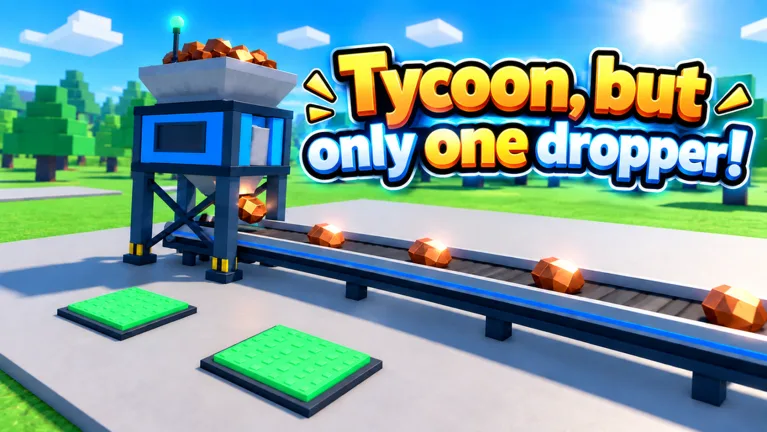 Image: Roblox / •Simple Games
The following prices apply to the October 15, 2026 pass lineup:
| Game pass | Price | Effect |
|---|---|---|
| Auto Upgrade | 12 Robux | Automatically purchases upgrades |
| 2x Cash | 249 Robux | Doubles all cash permanently |
| Turbo Dropper | 199 Robux | Makes the dropper drop 50% faster |
| VIP | 249 Robux | Adds a 1.5x cash multiplier, a VIP-only Money Printer upgrade, and a [VIP] chat tag |
| Lucky Drops | 149 Robux | Provides golden x10 drops from the start |
At 12 Robux, Auto Upgrade has the lowest price among these five passes. That makes its cost easy to compare, but price alone should not decide your purchase.
Choose Auto Upgrade if you want the game to handle upgrade purchases. Choose based on the stated effect if you are considering another pass: 2x Cash changes cash earnings, while Turbo Dropper changes how quickly the dropper produces drops.
Keep the numbers in context. Turbo Dropper's 50% increase applies to drop speed. Lucky Drops concerns golden x10 drops. Neither description should be read as the same benefit as doubling all cash.
VIP bundles several features together, including its own cash multiplier and Money Printer upgrade. If you are comparing it with Auto Upgrade, weigh those specific features against automatic buying instead of treating both purchases as interchangeable shortcuts.
Before buying several passes, play through some manual upgrades. Watch your cash balance, identify what you spend time doing, and purchase around that experience. Spend for a feature you actually want to use.
Build Your Income Before Spending Around the Factory
You can progress through the core upgrade loop manually. Earn cash, purchase improvements, and use the stronger income to fund further development.
Prioritize purchases that increase earnings. The factory includes money-making improvements such as solar panels and upgrades around the central machinery. Put those ahead of other purchases when your immediate goal is to raise income.
Follow the tutorial arrow to get started, then pay attention to the cash-per-second display as you develop the setup. That display gives you a practical way to see the result of an income upgrade without judging progress only by the size of your balance.
Use this routine while upgrading manually:
- Follow the tutorial's direction through the opening purchases.
- Identify available improvements to the money-making setup.
- Buy an income upgrade you can afford.
- Check your earnings display after the purchase.
- Let cash accumulate before returning for the next improvement.
Upgrade costs rise as the factory develops. A larger cash-per-second figure does not make every purchase immediately affordable, so expect stretches where your next step is simply to keep earning.
When a purchase remains out of reach, compare your balance with its displayed cost. Avoid assuming that an unavailable upgrade means something is broken. Waiting for more cash is part of the progression loop.
As a planning exercise, divide an upgrade's price by its additional cash per second when both figures are shown. That gives you an estimated payback time. Use the result to compare income purchases, while also checking whether a purchase opens another part of the factory.
Check the central setup again before spending elsewhere. It is easy to become focused on the next visible addition while overlooking another improvement to the machinery that funds everything.
Before buying Tycoon, but one dropper auto upgrade, spend enough time with this loop to understand your factory. Knowing how earnings and purchase costs interact makes it easier to judge whether automatic buying addresses the part of the game you find repetitive.
Use Rewards and Codes to Fund More Upgrades
Rewards give you more resources to work with while building the factory. Daily rewards, group rewards, tasks, wheel spins, and redemption codes all appear alongside the main cash-and-upgrade loop.
Check available claims while waiting for your balance to reach the next purchase. Then return to the factory and put cash toward the improvements you were saving for.
Cash boosts deserve particular attention because upgrading remains an ongoing activity. Prepare to keep developing your factory before redeeming a timed boost. That keeps your attention on progression during the reward's duration.
These October 2026 codes provide different kinds of help:
| Code | Reward | Duration |
|---|---|---|
Halloween | 25 Candy and 2x Cash | Cash boost lasts 10 minutes |
Update3 | 2x Cash | 15 minutes |
Gear | 15 Scrap | — |
To redeem a code:
- Open the game on Roblox.
- Select Codes on the right side of the screen.
- Paste the code into the Enter code here field.
- Select Redeem.
Copy the spelling and capitalization exactly, and remove extra spaces. Codes have limited availability, so redeem them while they remain active.
Keep reward types separate when planning purchases. Candy, Scrap, and cash each serve different purposes. The Blacksmith uses Scrap for equipment purchases, including the Scrap Tools Box; receiving Scrap does not add the same resource as a cash reward.
Claim available daily and task rewards, too. The wheel also awards cash rewards, giving you another activity to check between factory purchases.
Pair Tycoon, but one dropper auto upgrade with regular reward checks if you choose to buy it. Keep rewards in your routine rather than assuming automatic upgrade purchases cover every other part of the game.
Plan Your Factory Around Longer Progression Goals
Use Tycoon, but one dropper auto upgrade as one part of your factory plan. The broader progression still centers on improving your setup, expanding the base, and working toward rebirths.
Two milestones give that progression a clear direction:
| Progression milestone | Unlock |
|---|---|
| Rebirth 7 | Second floor |
| Rebirth 11 | Sky Wing |
Keep your next milestone in mind when choosing what to work toward. Check what a purchase unlocks, continue improving earnings, and use the rebirth targets to give your current run a concrete goal.
Update 3.1 adds expansions to the Sky Wing and speeds up early-to-midgame progression. It also introduces a Top 100 leaderboard with nametags. Whether you are interested in reaching another area or developing a richer factory, keep your attention on the purchases and milestones currently available to you.
Before your next spending session, run through a short checklist:
- Claim available daily and task rewards.
- Check the money-making machinery for upgrades.
- Review your next purchase cost.
- Check the unlock tied to your current progression goal.
- Decide whether you want manual purchasing or automatic buying.
The 12-Robux pass is easy to understand once you separate its purpose from the rest of the game. Buy it for automatic upgrade purchases, and keep using the factory's income, rewards, and progression milestones to guide what you do next.
FAQ
How much does Tycoon, but one dropper auto upgrade cost?
Auto Upgrade costs 12 Robux as of October 15, 2026. It is a game pass that automatically purchases upgrades for you.
Does Auto Upgrade double cash or make the dropper faster?
Its stated function is automatic upgrade purchasing. 2x Cash is a separate 249-Robux pass that doubles all cash permanently. Turbo Dropper costs 199 Robux and increases drop speed by 50%.
Can you upgrade the factory without buying Auto Upgrade?
Yes. You can buy upgrades manually with cash earned by your factory. Prioritize income improvements, watch the cash-per-second display, and let your balance accumulate when the next purchase costs more than you have.
When do you unlock the second floor and Sky Wing?
The second floor unlocks at rebirth 7, and the Sky Wing unlocks at rebirth 11. Update 3.1 adds further Sky Wing expansions, giving you more factory development to work toward.
Continue with
 Tycoon, but One Dropper Coin Counter Upgrade GuideUse the Tycoon, but one dropper coin counter guide to plan upgrades, track cash per second, claim useful rewards, and keep your factory progression moving.
More in Upgrades
Tycoon, but One Dropper 2x Cash: Boosts & Pass Guide
Get Tycoon, but one dropper 2x cash with timed codes or the permanent pass. Compare the 249 Robux upgrade, rewards, and tips to grow your factory faster.

Tycoon, but One Dropper Money Printer: VIP Upgrade Guide
Tycoon, but one dropper money printer guide: compare VIP perks and game passes, check Robux prices, and plan your next cash upgrades for a growing factory.
Tycoon, but One Dropper Nano Polisher: Upgrade Guide
Tycoon, but one dropper nano polisher costs $160 trillion in Update 3.1. Compare upgrade prices, plan purchases, and use cash boosts to grow your factory.
Tycoon, but One Dropper Phantom Printer Price Guide
Tycoon, but one dropper phantom printer costs $470 trillion in Update 3.1. Plan your upgrades, compare nearby costs, and use cash boosts to keep building.
Join the community
Official channels for news, updates and player help: