Tycoon, but One Dropper Guide: Earn Cash and Upgrade
Use this Tycoon, but one dropper guide to grow your income, choose upgrades, claim rewards, equip gear, and plan factory expansions. Build smarter today.
Jump to

How to Play Tycoon, but one dropper
One dropper can fund an enormous factory if you keep reinvesting its earnings. This Tycoon, but one dropper guide walks you through the purchases, free rewards, and progression goals that help keep your cash growing. Put the upgrade priorities in this Tycoon, but one dropper guide into practice, and you can spend more time expanding your factory instead of staring at an expensive red purchase button.
The core loop is straightforward: your dropper produces resources, your factory earns cash, and you spend that cash on upgrades. Those purchases improve your setup and open additional building opportunities. Rebirths give you longer-term milestones beyond the factory you are currently developing.
Play Tycoon, but one dropper on Roblox and follow the tutorial arrow to get started.
Your opening checklist
- Follow the tutorial. Let the arrow lead you through the opening setup.
- Claim your daily reward. Put the extra cash toward an available income upgrade.
- Check the group reward. Join •Simple Games through the game’s community links and claim the associated reward.
- Buy income-producing upgrades. Look around your dropper and conveyor before spending elsewhere.
- Watch the purchase colors. Green means you can afford the purchase; red means you need more money.
Cash accumulates automatically during normal factory operation. Watch your balance and income display as you buy upgrades so you can see how your spending affects production.
Update 3.1 speeds up early-to-midgame progression and adds more Sky Wing expansions. Keep that version in mind when comparing your progress with older walkthroughs.
Choose Upgrades That Keep Your Cash Growing
The main spending priority in this Tycoon, but one dropper guide is simple: buy upgrades that improve earnings, then use that stronger income to fund your next expansion.
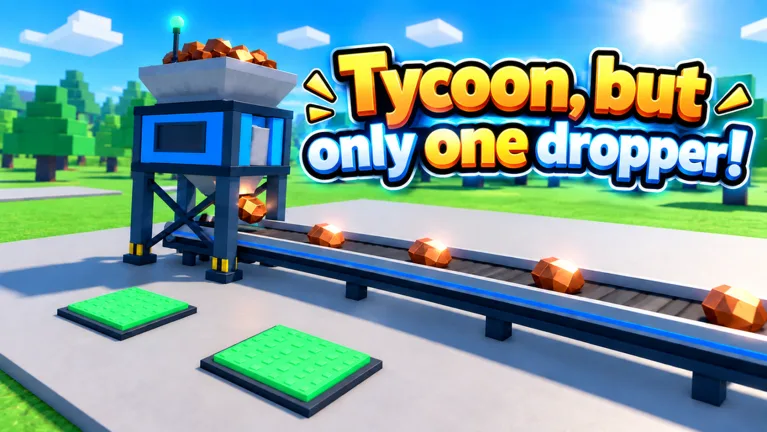 Image: Roblox / •Simple Games
Several kinds of purchases contribute to your factory. Machines along the conveyor can improve drop value, while other structures increase cash generation. Solar panels, wind turbines, and the water tower all appear during progression, alongside ore upgrades and increasingly elaborate processing equipment.
| Upgrade or purchase | What to inspect before buying |
|---|---|
| Drop-processing machinery | The displayed drop-value effect |
| Cash-generating structures | The effect on your income display |
| Ore upgrades | The resource upgrade available on the purchase |
| Conveyor extensions | The next section of your production route |
| Factory expansion | The price and additional building opportunities |
Check the production line before saving for an expansion
Walk through the inside of your factory whenever progress starts dragging. Look for affordable machinery around the conveyor, then check the surrounding income structures.
A large expansion price can make the next purchase feel impossibly far away. Before waiting for that entire amount, inspect the upgrades you can already afford. Buy an earnings improvement when it helps you work toward that larger goal.
Keep checking newly available purchases after each upgrade. Progression introduces additional machines and building sections, so the purchase you saw earlier is only part of your current options.
Compare price with the earnings increase
For an income upgrade that displays a clear cash-per-second increase, divide its cost by that increase to estimate its payback time. Use that comparison when choosing between two affordable purchases.
This Tycoon, but one dropper guide uses that calculation as a spending aid. Keep unlocks in mind, too: a conveyor extension can lead you into another section of machinery, giving that purchase a purpose beyond its immediate effect.
Check the income display after buying a machine and allowing its drops to travel through the line. That gives you a clearer picture of what changed.
Expect prices to rise with production
Your income can reach millions per second while upcoming purchases cost billions. Later sections push those numbers much higher.
Keep comparing your earnings with your next target. A large balance is useful only in relation to what you are trying to buy. When every nearby purchase is red, let cash accumulate while you check rewards, quests, or nearby event pickups.
Claim Codes, Daily Rewards, and Free Spins
Free rewards support your factory purchases, especially while you are building momentum. This Tycoon, but one dropper guide puts the October code rewards alongside the recurring activities you can check during a session.
October 2026 codes
Start with these October codes for temporary cash boosts, Halloween currency, and Scrap.
| Code | Reward |
|---|---|
Halloween | 25 Candy and 2x Cash for 10 minutes |
Update3 | 2x Cash for 15 minutes |
Gear | 15 Scrap |
To redeem a code:
- Open the game and wait for your base to load.
- Select Codes on the right side of the screen.
- Paste the code into the Enter code here field.
- Press Redeem and check the redemption message.
Copy each code exactly as written, including capitalization, and remove extra spaces. Each code has a limited redemption period, and an entry already used on your account will not provide another reward.
Redeem timed cash boosts when you are ready to keep playing and purchasing upgrades. Keep your next purchases in mind so you can reinvest the extra earnings throughout the boost window.
Check the daily menu and spin timer
Open the daily menu during your session and claim completed objectives. Recheck it after making several purchases, since factory progress can complete tasks while you are focused on building.
The wheel also offers free spins on a timer. A 15-minute wait appears between free spins, and rewards include cash amounts expressed as minutes of earnings and tokens.
Check the timer while waiting for an expensive purchase. When a spin becomes available, claim it and return to your upgrade route.
Collect Halloween Candy nearby
During the Halloween event, Candy Pails appear around the factory area. Watch for the nearby-pail notification and orange guidance while moving between upgrades.
Collect nearby pails during natural breaks in your buying routine. Candy is separate from the cash used for ordinary factory purchases, so keep track of both currencies when checking rewards.
Use Scrap, Equip Gear, and Work Toward Rebirth Milestones
Factory cash is only one part of progression. Scrap feeds into the Blacksmith system, equipment appears in My Gear, and rebirth milestones give you goals for additional factory areas.
Use this Tycoon, but one dropper guide to keep those systems on your checklist as your production line grows.
Spend Scrap at the Blacksmith
The Gear code awards 15 Scrap. At the Blacksmith, you can spend Scrap on a tools box that produces equipment.
Open the box, then check My Gear to find the item you received and equip it. Glasses are one equipment result available from this system.
Inspect the equipment screen after opening a box. Opening the reward and equipping its contents are separate actions worth checking before you return to building.
Keep expansion and rebirth goals visible
Factory expansions introduce more building space and additional machinery. Later progression includes equipment such as the Nano Polisher and Phantom Printer, followed by increasingly advanced production sections.
Rebirth progression also has specific area milestones:
| Progression target | Area or opportunity |
|---|---|
| Factory expansion | Additional factory development |
| Rebirth 7 | Second floor |
| Rebirth 11 | Sky Wing |
| Update 3.1 Sky Wing progression | Additional Sky Wing expansions |
Check the Rebirth menu as you approach your next milestone. Keep the second floor and Sky Wing in mind when deciding what you want to accomplish during a session.
Work toward a specific objective: reach the next rebirth milestone, purchase an expansion, or complete another run of production upgrades. That gives your spending a clear destination as the prices grow.
Before making a rebirth decision, read the in-game menu and its current requirements. Build your next steps around the information displayed there.
Understand the Robux Passes Before Buying
The game sells several passes with different effects. This Tycoon, but one dropper guide separates their functions so you can match a purchase to the feature you actually want.
Prices below reflect October 15, 2026.
| Game pass | Price | Included effect |
|---|---|---|
| 2x Cash | 249 Robux | Permanently doubles cash |
| Auto Upgrade | 12 Robux | Automatically buys every upgrade |
| Turbo Dropper | 199 Robux | Makes the dropper drop 50% faster |
| VIP | 249 Robux | 1.5x cash, a VIP-only Money Printer upgrade, and a VIP chat tag |
| Lucky Drops | 149 Robux | Golden x10 drops from the start |
Choose by the feature you want
Check the wording of each pass before purchasing. Auto Upgrade handles buying upgrades automatically. Turbo Dropper changes drop frequency. Lucky Drops provides golden x10 drops from the start.
For cash-focused purchases, compare 2x Cash with VIP. The former offers a permanent cash multiplier, while VIP combines its multiplier with the Money Printer upgrade and chat tag.
Look at the specific benefits rather than comparing prices alone.
You can also continue buying upgrades manually with earned cash. Daily rewards, codes, free spins, and the production line all remain part of that routine.
Keep checking your available purchases, claim completed rewards, and put earnings improvements to work as you move toward the next factory section.
FAQ
What should I upgrade first in Tycoon, but one dropper?
Prioritize available upgrades that improve cash generation or drop value. Check the machinery around your conveyor and nearby income structures before saving for a large expansion. The central spending tip in this Tycoon, but one dropper guide is to reinvest earnings into stronger production.
How do I redeem Tycoon, but one dropper codes?
Select Codes on the right side of the screen, paste an entry into Enter code here, and press Redeem. Enter Halloween, Update3, and Gear exactly as written, without extra spaces.
When do the second floor and Sky Wing unlock?
The second floor is tied to rebirth 7, and the Sky Wing is tied to rebirth 11. Update 3.1 adds further expansions on the Sky Wing.
Does Auto Upgrade cost Robux?
Yes. Auto Upgrade costs 12 Robux as of October 15, 2026, and automatically purchases upgrades. You can purchase upgrades manually using earned cash.
Continue with
 Tycoon, but One Dropper Controls: Upgrades and MenusLearn Tycoon, but one dropper controls for upgrades, codes, gear, and rewards. Navigate factory menus and plan your next purchases with a beginner guide.
More in Guides
See all GuidesPopular pages
Tycoon, but One Dropper Codes: Free Rewards in October
Get Tycoon, but one dropper codes for Candy, Scrap, and 2x Cash boosts. Find current rewards, expired codes, and steps to redeem them in Roblox today.
Tycoon, but One Dropper Leaderboard: Top 100 Rank Guide
Explore the Tycoon, but one dropper leaderboard, Top 100 nametags, cash upgrades, and rebirth milestones. Plan your next factory push with practical tips.
Tycoon, but One Dropper Discord: Community Join Guide
Find the Tycoon, but one dropper discord community, follow update news, check reward codes, and get practical help with upgrades, gear, and factory growth.
Tycoon, but One Dropper Candy: Halloween Event Guide
Tycoon, but one dropper candy comes from Halloween pails and a free code. Learn how to collect it while upgrading your factory during the seasonal event.
Join the community
Official channels for news, updates and player help: