Tycoon, but One Dropper Money Fast: Earn More Cash
Tycoon, but one dropper money fast tips: prioritize income upgrades, use cash boosts, claim rewards, and keep your factory growing with smart spending.
Jump to

How to Make Money Fast in Tycoon, but one dropper
Your next income upgrade can do more for your factory than a bigger cash balance sitting untouched. The Tycoon, but one dropper money fast strategy is to improve production, reinvest your earnings, and use temporary cash boosts while actively buying upgrades. Follow that loop to shorten the wait between purchases and keep expensive machines within reach.
Start your Tycoon, but one dropper money fast run by following the tutorial arrow, collecting available rewards, and buying upgrades that increase earnings. Cash collects automatically during play, so focus your attention on the factory’s production chain and income display.
Update 3.1 includes faster early-to-midgame progression and additional Sky Wing expansions. Keep that version in mind when planning your next purchase: the goal is to keep growing your earning power as new upgrades become available.
Use this opening sequence:
- Follow the tutorial to establish your factory.
- Claim your available daily and group rewards.
- Buy an affordable upgrade that increases income.
- Check the change in your cash-per-second display.
- Put the next earnings toward another production improvement.
Resist the urge to buy every affordable button immediately. Read what each purchase does, then direct your cash toward the machinery that earns the next round of money.
Prioritize Production Upgrades Before Other Spending
The core of a Tycoon, but one dropper money fast strategy is repeated reinvestment. You have one dropper, but the factory around it includes upgrades that improve production and increase the value of what moves through your setup.
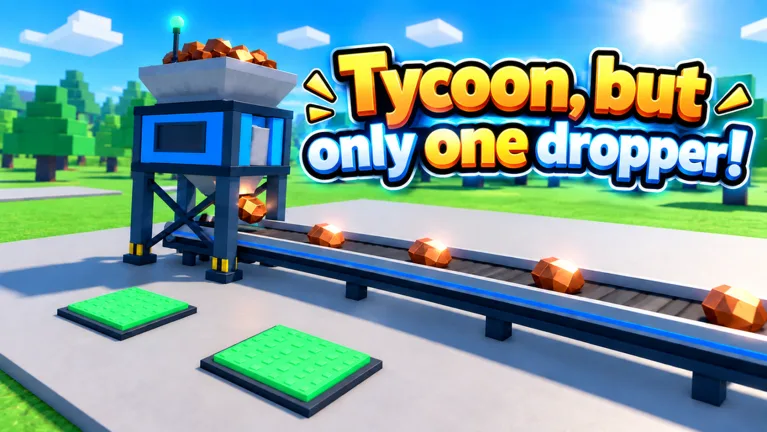 Image: Roblox / •Simple Games
Early purchases include equipment such as the Solar Panel and Coin Counter. Later progression introduces machinery such as the Water Tower, Turbo Motor, and Gold Ore upgrade. Keep checking the interior of your factory as you build; an overlooked income upgrade deserves attention before another purchase drains your balance.
| Purchase or feature | Role in your factory | What to check before spending |
|---|---|---|
| Dropper upgrades | Improve your central income setup | The upgrade’s stated production benefit |
| Solar Panel | An early income-building purchase | Its cost against your available cash |
| Water Tower | Increases income during progression | Your cash-per-second display after buying |
| Gold Ore upgrade | Changes ore into gold | Its place in your current upgrade chain |
| Factory expansion | Expands your setup | What the next expansion makes available |
Compare Cost With the Income Increase
Check both sides of an upgrade: the cash it requires and the extra income it provides. A large price alone tells you little about whether the purchase will help your next stretch of progression.
When the game displays enough information, compare the upgrade’s cost with its additional earnings. Favor a purchase that returns its cost sooner, while keeping required progression purchases in view.
For example, late purchases can reach billions while your income display is already showing millions per second. Watch the full number and its suffix. Confusing millions with billions makes an affordable-looking goal feel much closer than it actually is.
After buying an upgrade, check the income display again. Use that change to understand which parts of your factory are driving growth.
Search Your Existing Factory Before Saving for Something Huge
Before committing to a long wait, walk through the machinery you already own and inspect available purchases. Look for an affordable production improvement you passed earlier.
Do this especially after collecting a reward or finishing another upgrade. Your balance has changed, and a previously unaffordable purchase may now fit your budget.
Keep the spending decision concrete: choose your next income upgrade, check its cost, and save toward it. Avoid scattering cash across unrelated purchases while that target remains unfinished.
Claim Cash Boost Codes, Daily Rewards, and Free Spins
Free rewards support the Tycoon, but one dropper money fast loop by supplying extra resources or increasing earnings for a limited time. Claim them alongside your normal upgrades.
For October 2026, the useful code rewards include temporary cash multipliers, Halloween Candy, and Scrap. Keep those currencies separate when planning purchases: Candy and Scrap serve different purposes from the Cash used to develop your factory.
Cash Boost Codes for October 2026
| Code | Reward | Status as of October 14, 2026 |
|---|---|---|
Halloween | 25 Candy and 2x Cash for 10 minutes | Active |
Update3 | 2x Cash for 15 minutes | Active |
Gear | 15 Scrap | Active |
BOOST | 2x Cash for 30 minutes | Expired |
FREE | 50,000 Cash | Expired |
RELEASE | 10,000 Cash | Expired |
Redeem codes through the panel on the right side of the screen:
- Open Codes.
- Paste the code into the Enter code here field.
- Select Redeem.
- Check the reward or boost indicator before returning to your factory.
Copy the capitalization shown above and remove extra spaces. If a code has already been redeemed on your account or has expired, move on to your available rewards and upgrades.
Collect Rewards Between Purchases
Daily rewards and the group reward provide additional cash. Join the Simple Games group through the community links attached to the official Tycoon, but one dropper Roblox page, then claim the corresponding reward in the game.
Check the daily task panel for completed objectives, too. Claim finished tasks before returning to the upgrade chain.
Free spins offer another reward opportunity. The wheel includes cash-time prizes, including five-minute and 30-minute cash rewards, and uses a 15-minute cooldown between free spins. Check it when available, then continue building rather than waiting beside it.
Use Temporary Boosts During an Active Upgrade Session
A temporary multiplier has a fixed duration. Make room to play through that window before redeeming a cash boost.
For a Tycoon, but one dropper money fast session, identify your next purchases before activating the reward. Then stay near your factory and reinvest the extra earnings as upgrades become affordable.
A stronger production setup gives a cash multiplier more income to work with. Spend cash already available on worthwhile production upgrades before beginning your boost window, then keep upgrading throughout it.
| Session stage | Action | Purpose |
|---|---|---|
| Before redeeming | Inspect available production upgrades | Choose where the boosted earnings will go |
| Before redeeming | Spend existing cash on useful income upgrades | Improve production before the timer begins |
| During the boost | Monitor cash and buy planned upgrades | Keep increasing your factory’s earnings |
| Between purchases | Claim completed daily tasks | Collect rewards while production continues |
| After the boost | Review your next upgrade target | Continue with a clear spending goal |
Avoid assuming that several rewards combine into a larger multiplier. Read the active boost display and plan around the effect shown there.
Keep Scrap and Candy Out of Your Cash Budget
The Gear code gives Scrap, which connects to the Blacksmith equipment system. The Blacksmith offers a Scrap Tools Box, and equipment appears in My Gear.
Use the equipment screen to inspect what you receive. Choose gear by its displayed effects rather than its appearance, and keep your cash plan focused on factory upgrades.
Halloween Candy belongs to the seasonal event. Collect nearby candy while managing your factory, but keep the event currency separate from the money needed for machinery.
Understand Paid Upgrades and Plan Your Next Expansion
You can follow a Tycoon, but one dropper money fast routine through normal production, reward claims, and reinvestment. Paid passes add specific benefits, so compare their actual effects before spending Robux.
The permanent cash multiplier, faster dropper, and automatic purchasing pass do different jobs. Match a purchase to the feature you want.
| Game pass | Price on October 15, 2026 | Listed effect |
|---|---|---|
| 2x Cash | 249 Robux | Doubles all cash permanently |
| Auto Upgrade | 12 Robux | Automatically buys upgrades |
| Turbo Dropper | 199 Robux | Makes the dropper drop 50% faster |
| VIP | 249 Robux | 1.5x Cash, a VIP-only Money Printer upgrade, and a VIP chat tag |
| Lucky Drops | 149 Robux | Golden x10 drops from the start |
Auto Upgrade handles purchasing. The 2x Cash pass changes earnings directly, while Turbo Dropper changes drop speed. Compare those descriptions carefully instead of choosing purely by price.
Check the purchase prompt before spending, and avoid calculating a combined multiplier from several passes. Use the game’s displayed income to judge your current setup.
Keep Expansion Tied to Your Production Goal
Factory expansions are part of progression, and Update 3.1 adds more expansion content to the Sky Wing. Inspect the next expansion purchase and the machinery it opens before committing your balance.
Use the rebirth panel to review your progression options when you reach that stage. Finish planning your immediate purchases before starting a temporary cash boost, so you can spend the timed window managing income.
Keep your Tycoon, but one dropper money fast checklist short:
- Claim available daily, group, and task rewards.
- Inspect affordable production upgrades.
- Check your cash-per-second display after purchases.
- Use temporary cash boosts when you have time to keep upgrading.
- Return to free spins when the cooldown finishes.
- Choose an expansion target before saving a large balance.
As prices climb, some waiting remains part of the tycoon loop. Use those pauses to check tasks, rewards, and overlooked machines. Each purchase should move you toward stronger production or the next part of your factory.
FAQ
What is the Tycoon, but one dropper money fast strategy?
Prioritize upgrades that increase income, claim available rewards, and reinvest your earnings. Use temporary 2x Cash codes during sessions when you can keep buying upgrades. Watch the cash-per-second display to track how your production changes.
Does Cash collect automatically?
Yes, Cash collects automatically during play. Focus on choosing upgrades, monitoring your balance, and claiming separate rewards such as completed daily tasks and free spins.
Which codes give cash boosts in October 2026?
Halloween gives 2x Cash for 10 minutes alongside 25 Candy. Update3 gives 2x Cash for 15 minutes. The older BOOST, FREE, and RELEASE codes are expired as of October 14, 2026.
What is the difference between Auto Upgrade and 2x Cash?
Auto Upgrade automatically buys upgrades and costs 12 Robux. The 2x Cash pass permanently doubles all cash and costs 249 Robux. These are the prices listed for October 15, 2026; check the in-game purchase prompt before buying.
Continue with
 Tycoon, but One Dropper Scrap: Gear and Blacksmith GuideLearn how Tycoon, but one dropper scrap works, redeem Gear for 15 Scrap, and use the Blacksmith to open a Scrap Tools Box and find equipment in My Gear.
More in Currencies
See all CurrenciesPopular pages

Tycoon, but One Dropper Codes: Free Rewards in October
Get Tycoon, but one dropper codes for Candy, Scrap, and 2x Cash boosts. Find current rewards, expired codes, and steps to redeem them in Roblox today.
Tycoon, but One Dropper Leaderboard: Top 100 Rank Guide
Explore the Tycoon, but one dropper leaderboard, Top 100 nametags, cash upgrades, and rebirth milestones. Plan your next factory push with practical tips.
Tycoon, but One Dropper Discord: Community Join Guide
Find the Tycoon, but one dropper discord community, follow update news, check reward codes, and get practical help with upgrades, gear, and factory growth.
Tycoon, but One Dropper Controls: Upgrades and Menus
Learn Tycoon, but one dropper controls for upgrades, codes, gear, and rewards. Navigate factory menus and plan your next purchases with a beginner guide.
Join the community
Official channels for news, updates and player help: